



How To Sell Meat Online: A Quick Guide for Butchers
All small business owners want to see higher profits — but how do they plan to make it happen? Sometimes, coming up with solid promotional plans and stocking decisions can feel like you’re throwing ideas at the wall and seeing what sticks.
But in the face of rising tariffs, higher cost of living, and economic uncertainty, you can’t afford to fly blind.
The good news? You don’t have to!
If you’re using a modern point of sale (POS) system in your grocery store, you’re already generating invaluable data you can use to optimize pricing, reduce food spoilage, negotiate with suppliers, improve staffing schedules, and improve customer retention.
While it might be intimidating at first, getting comfortable with tracking these grocery store metrics makes a big difference in the long term.
In this blog, we’ll cover the key metrics you should track — and how to improve them.
How To Track Grocery Store Metrics
Before we get into which grocery store metrics you should keep an eye on, let’s briefly address how to track them.
Every time you use your POS system to receive an invoice, create a purchase order, process a refund, or ring up a sale, it’s tracking data to be pulled into the reporting and analytics tools on your POS system. Then, it can create helpful graphs and lists that contextualize all that information.
Why is that helpful? Many small grocery store owners run on instinct — and while those instincts are important, having an unbiased overview of store performance can support your decisions or uncover opportunities or areas for improvement.
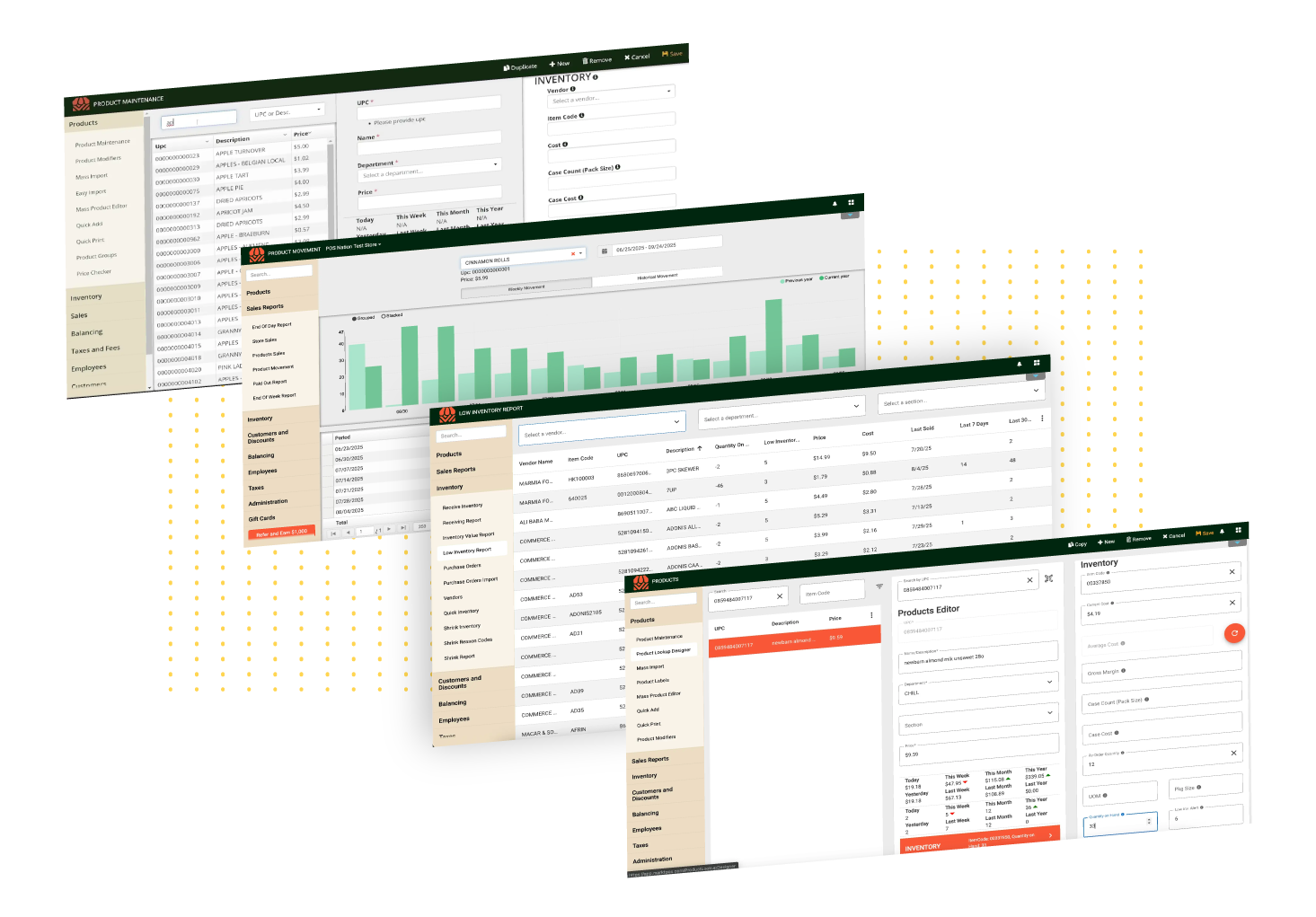
Many grocers already keep a close eye on their daily and monthly sales, but this number can be misleading. Sales alone won’t help you understand your store’s profitability, which products are contributing the most to your success, how losses from spoilage are factored in, and other key metrics you need to make smart business decisions.
The good news is that tracking grocery store metrics isn’t a huge time sink, nor does it require a specialized data expert. Systems like Markt POS let you look at important reports from anywhere, or even schedule reports to be regularly emailed directly to you.
Put another way, the reports on your POS system won’t replace your instincts — they make them sharper.
7 Key Grocery Store Metrics to Track [+ How To Improve Them]
Yes, tracking grocery store key performance indicators (KPIs) and metrics helps you make more informed business decisions. But where do you start?
Here are the most important metrics to keep an eye on.
1. Inventory Turnover
How much time passes from the moment a box of cereal hits your shelves to the minute a customer takes it home?
This grocery store metric is called your inventory turnover rate. Your inventory turnover rate is a measure of how quickly and efficiently stock moves through your store.
Your POS system should provide you with a helpful breakdown of your inventory turnover rate overall and by item, giving you insights into which items are selling — and which are sitting.
You may want to look at inventory turnover separately per department, as the shelf-life of products varies greatly — a “healthy” turnover rate for a can of soup is very different than an item with a short shelf life like produce and meat.
How To Improve Your Inventory Turnover Rate
A good inventory turnover rate is crucial for your grocery store’s success, so let’s take a look at a few ways you can improve this grocery store metric:
- Optimize your stock. Use your POS system’s sales records to identify your bestselling and slowest-moving items. Equipped with this data, you can tailor your offerings to your customers’ preferences and increase your sales.
- Spruce up your inventory management techniques. To prevent overstocking and spoilage, make sure you’re using the best tools and practices to manage your stock. We recommend relying on a POS system with real-time inventory monitoring.
- Plan strategic promotions. An enticing promotion is a great way to move your stock and increase your inventory turnover rate. Identify which items you have too much of, mark down the price, and promote the sale.
Leveraging these strategies can boost your inventory turnover rate, save space, eliminate waste, and boost your bottom line.
Related Read: What Is a Good Inventory Turnover Ratio for Grocery Stores? ANSWERED
2. Average Transaction Value
The next grocery store metric to watch is your average transaction value.
Average transaction value is as simple as it sounds: It’s the average amount your customers spend per transaction.
It’s important to consider your average transaction value in conjunction with the total number of transactions your store processes each day. For example, if you own a corner store, you’ll likely see a lower average transaction value, but you’ll have more customers coming through your door on a daily basis.
On the other hand, if you own a specialty market or an all-purpose grocery store, increasing your average transaction value should be a priority.
How To Increase Your Average Transaction Value
This grocery store metric is an essential ingredient for higher profits, so here are three ways to increase your average transaction value:
- Cross-sell related products. Place related products near each other or use bundle promotions to encourage your customers to add additional items to their carts. For example, before a long weekend, you might create a display with cookout essentials like hot dogs, hamburgers, buns, chips, and condiments.
- Incentivize spending with a customer loyalty program. Consider implementing a point-based loyalty program that allows your customers to unlock special discounts and perks when they spend more.
- Revamp your store layout and product placement. Place your highest-margin items in the highest-traffic areas of your store to increase visibility.
Give these three strategies a try to boost your average transaction value.
3. Customer Retention
Did you know that it’s significantly more difficult — and more expensive — to attract a new customer than to keep an existing one? Not only that, but repeat customers tend to spend more on average than a new customer.
That’s why your customer retention rate is a key grocery store metric to watch.
Your customer retention rate is your store’s ability to keep customers coming back over time, highlighting your shoppers’ satisfaction and loyalty.
The only real way to measure customer retention is to implement a customer loyalty program. Once a customer’s contact information is in your system, you can use it to track their sales history, visit frequency, and other metrics.
You won’t need to do this individually for each customer, but you can track your customer loyalty data as a whole for important information on customer retention. Diving into this data will give you invaluable insights into how engaged your customer base is and help you segment different types of shoppers.
How To Drive Up Customer Retention Rates
To improve this critical grocery store metric, we recommend getting creative with strategies like these:
- Eliminate pain points for your shoppers. Long checkout lines, a confusing store layout, and frequent stockouts lead to low customer satisfaction and retention rates. Think through every aspect of the customer experience, and address any problems preventing them from choosing your grocery store.
- Send out personalized offers. Send relevant discounts and offers based on a customer’s purchase history. By filtering customers based on what they buy, you’re more likely to send them deals they’re actually interested in.
- Offer tangible loyalty benefits. Many loyalty programs fail because the benefits are unclear, not worth the effort, or it takes too long to redeem points for a discount. Configure your loyalty program so rewards are relatively easy for customers to earn.
- Surprise and delight. Make shopping at your grocery store a special, memorable experience. Train your team to provide top-notch customer service and create a genuine connection with your shoppers.
- Segment your customers for personalized marketing. Instead of just personalizing offers based on what items a customer has bought before, look for patterns in your frequent customers (e.g. shoppers who come infrequently but spend a lot, lunch-time shoppers, snackers, ready-meal buyers). You can use this information to send out relevant offers to those segments (like current offers on staple items for family shoppers or lunch deals for midday shoppers).
Going above and beyond for your customers ensures they come back time and time again, relying on you as their exclusive grocer.
4. Shrinkage and Spoilage Rates
Shrinkage accounts for losses due to theft as well as spoilage. Because grocery stores deal with so many perishable food items, some shrinkage is inevitable.
The average shrink rate for a grocery store sits around 3%, but it can vary wildly by department, with produce departments typically having the highest losses.
While theft might account for a small amount of shrinkage, the vast majority is a result of spoilage due to overstocking, improper storage, or a lack of visibility.
We recommend you pull up spoilage and loss tracking reports by department. This helps you spot departments with high shrinkage rates to find problem areas faster.
H4: How To Reduce Your Shrink Rates
Investing in basic store security is a must for small grocers, but here are some other tactics you can use to reduce your shrinkage rate:
- Train staff in the first in, first out (FIFO) stocking method. This method ensures that the items you receive earliest are the ones put out on the shelves first. This also includes stock rotation, so items with upcoming expiry dates are front and center on shelves and produce bins.
- Rethink your produce displays. Everyone loves a big, colorful produce display — but sometimes they’re so big that the fruits and veggies don’t sell fast enough before they go bad. Invest in dividers and shelf risers so produce bins look full without being wasteful.
- Regularly check your refrigeration and stocking technique. A lot of spoilage results from cold inventory being stored at room temperature before going into a fridge, or refrigeration units not staying cool enough because of failing seals or parts.
- Check your inventory turnover. Slow inventory turnover (mentioned above) can be an indicator that you’re overordering certain items. Regularly check your turnover rates to adjust your purchase orders.
- Track expiration dates digitally. Tracking expiration dates on your inventory management software helps you spot items that should be discounted or bundled before going bad without having to physically walk the store to find them.
Tackling shrinkage is an excellent strategy for reducing your operating costs, but it can take time. Start with your biggest problem departments, then take those lessons and apply them to the whole store.
5. Profit Margin by Department or Product Category
Grocery store profit margins are notoriously narrow, usually sitting between 1% and 5%. But just knowing your store’s overall profitability doesn’t help you refine your pricing or marketing strategies.
This is why it’s essential to understand the specific products that contribute most to your profits, and to make pricing adjustments when necessary.
By tracking your costs, markup, and profit margin for each item in your inventory, you can get a detailed view of your bestsellers in each department or per product category.
You can pull profitability reports based on these categories and departments to improve product selection or find cross-selling opportunities.
How To Increase Profit Margins
We don’t need to tell you why boosting your profit margins is important, but knowing where to start can be tough. Here are a few suggestions:
- Focus on underperforming departments. Starting with departments that have consistently lower profit margins helps you adjust median prices, phase out underperforming items, and expand your stock of high-margin or specialty items.
- Find your popular, high-margin items. Finding which items in your store are popular and have high margins helps boost profits by expanding the selection of those product categories or creating promotions that pair lower-cost staples with high-margin products.
- Periodically adjust pricing. Looking at profit margins over time helps you understand the impact of changing vendor costs, seasonal shifts, tariffs, and other factors. This helps you make more strategic cost adjustments throughout the year.
Grocery store pricing is a tricky balancing act — you have to find a cost that customers accept while not undervaluing yourself. Looking at profitability metrics can help you find a fair pricing strategy.
6. Operating Costs
Speaking of profit margins, one of the reasons that grocery store margins are so low despite high average revenue is operating costs.
Your operating costs include your leasing costs, utility bills, maintenance, software subscriptions, employee payroll, and inventory costs. Higher operating costs eat into your profits, but reducing them is nearly impossible if you don’t track them.
Getting a clear view of your operating costs is your first step to taking control. Start by making a list of your monthly expenses, including:
- Leasing costs
- Utilities
- Recurring software and hardware costs (e.g. POS systems, website costs, security cameras)
- Labor
- Inventory costs (including cost of goods sold, shrinkage losses)
- Maintenance and repair costs
Once you have a bird’s eye view of your expenses, you can dive more deeply into each category. By simply making a list, you may discover areas where you’re overpaying or costs that look high.
How To Improve Grocery Store Operating Costs
Some operating costs, like rent, are out of your control. But there are many others that can be significantly reduced. Here are some tips:
- Use technology to work more efficiently. Modern POS systems like Markt POS reduce data entry, manual price input, and other tedious tasks, cutting your labor costs and freeing up time to work on more important things like marketing and serving customers.
- Always assess your inventory. Inventory is by far the largest expense at most grocery stores, so finding ways to negotiate better rates with suppliers, prevent overordering, and improve merchandise planning are key to keeping costs down.
- Understand peak hours to adjust staffing. Labor is another significant cost, and cutting staff pay will only lead to unhappy employees. Instead, use your reports to understand peak hours by department to make sure you have enough staff on hand when you need it (and reduce staff when you don’t).
While this is by no means an exhaustive list of fixes, it should give you an idea of the improvements you can make once you understand your numbers.
7. Checkout Speed
No one likes waiting in line — and if your checkout is consistently slow or inefficient, customers may decide to shop elsewhere.
Keeping track of how fast customers move through your checkout lanes is an important grocery store metric to keep an eye on. Slow checkout speeds could be a sign that your POS system is hard to use, that you should improve your employee training, or that parts of the checkout process need to be revamped.
In less technical terms, finding ways to shorten checkout lines at your grocery store is an easy way to improve the customer experience and encourage repeat business.
How To Speed Up Grocery Store Checkout
Checkout speed is a surprisingly important metric for customer satisfaction — luckily, it’s one of the easiest to improve. Here are some easy tips to shorten lines in your store:
- Use a grocery-specific POS system. Using old or generic POS systems can slow down checkout because they don’t integrate with scales, make it difficult to apply discounts and loyalty rewards, and are not user-friendly.
- Periodically check your “missing items” report. When items are missing in your system, lines can slow to a crawl while cashiers run to the aisles to find the right price. Use a missing items report to see which items couldn’t scan and match them with UPCs to quickly add them to your system.
- Consider self-checkout. Self-checkout isn’t the right fit for every store, but if you have the space, a self-checkout lane can speed up lines. Instead of buying specialized self-checkout stations, Markt POS allows you to implement self-checkout using the same touchscreens you use in your normal checkout lanes.
- Train your staff. Technology isn’t the only fix for a slow checkout lane. Taking the time to train employees on how to operate your POS system, what to do in specific scenarios (like how to process refunds and apply loyalty rewards), and tips for efficient bagging all lead to faster checkout and happier customers.
Long lines are one of the first things you should look to improve in your grocery store, as they can leave a bad taste in customers’ mouths — even if the rest of the shopping experience went well.
Tackle Your Grocery Store Goals With Markt POS
Ready to take on the challenge of improving these grocery store metrics? We’re here to help.
Markt POS is the solution you need to boost your grocery store’s bottom line. With robust inventory management, powerful sales reporting, and a built-in loyalty program, our all-in-one system has everything you need to improve your inventory turnover rate, increase your average transaction value, and grow your customer base.
Take Markt POS for a spin by scheduling a live demo, or use our Build and Price tool to create your custom POS solution today.

Luke has been in the grocery industry for 15 years. Starting out as a POS technician, he worked his way up to VP. Luke has seen, adopted, and even contributed to significant technological advancements, such as moving from server-based systems to cloud solutions with Markt POS and the AI revolution transforming store operations. Luke is our resident expert for all things grocery store and point of sale technology. “Store owners spend too much time on paperwork instead of building their business. After helping my best friend's father run his grocery store, I made it my mission to give hardworking store owners better tools to succeed.”